Guides
Carpet Cleaning Local Search: Profile, Reviews and Service Pages
A carpet cleaning local seo guide to Google Business Profile setup, honest Google review requests, service-area choices and useful service pages.
What to take away
- For carpet cleaning local SEO, use your Google Business Profile to describe the work you actually take: wool rugs, viscose upholstery, pet treatment and commercial carpet tiles.
- Set Google Business Profile service areas to towns you will actually drive to and serve.
- Ask every customer for an honest Google review, with no discount, gift or screening.
- Track calls and form fills by town, not by view count, because views do not pay for fuel.
- Re-check the profile whenever your minimum charge, service area or method changes.
Match the profile to the work you take
Google ranks local results on relevance, distance and prominence, according to Google's local ranking guidance. For a carpet cleaner, relevance is specific. In your Google Business Profile, choose the most accurate primary category, add only relevant secondary categories, and list the services you actually perform. A profile that says "carpet cleaning" competes with every van in the county; one that also describes wool area rugs, viscose upholstery and commercial carpet tiles makes those services clear to potential customers.
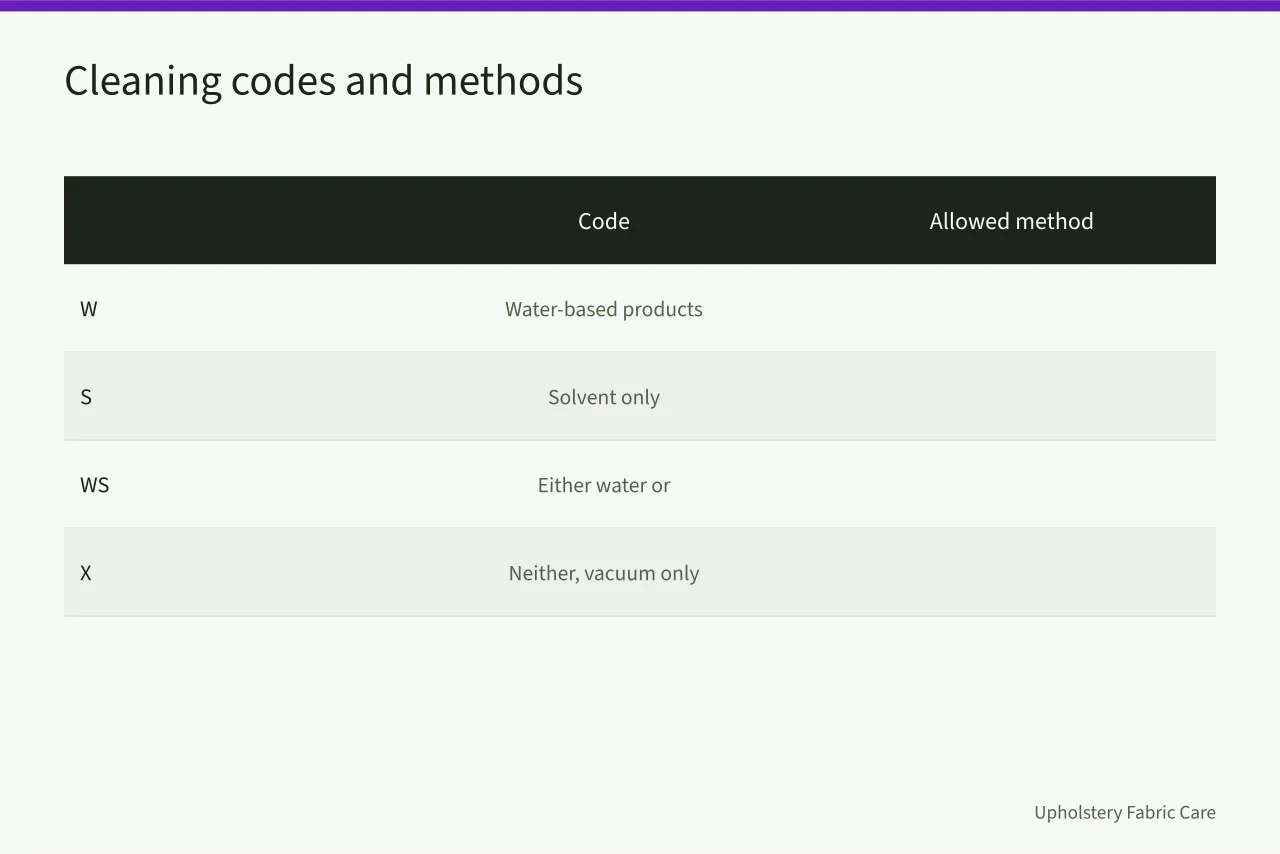
The cleaning code on the tag decides which jobs you can quote. W takes water-based products, S solvent only, WS either, X neither, vacuum-only. A viscose rug carries the code that tells you if your truck-mount can touch it.
In the Google Business Profile services list, include the work and cleaning codes you actually handle, and refer the rest out. A referred job costs you nothing and protects the review.
Service-area settings are the second lever. In Google Business Profile, enter towns or ZIP codes you will actually serve inside your drive-time limit, not the whole metro. A profile that appears in a town you will not serve produces calls you decline; those calls waste the route and marketing effort you built.
Reviews and the FTC line
Ask every customer, at the end of the job, by text or email, and include a direct link to your Google review form. Ask all of them, not just likely happy customers. The FTC's Consumer Reviews and Testimonials Rule (16 CFR Part 465) addresses fake reviews and incentives conditioned on positive or negative sentiment. The FTC's Endorsement Guides (16 CFR Part 255) address clear disclosure of material connections, including incentives when applicable. Google also prohibits incentivized reviews, so ask without a discount, gift or payment.
Copyable request: “Thanks for choosing [Business]. If you’d like, please leave an honest Google review here: [Google review link]. No pressure—your feedback helps us improve.” Use the review link from your Google Business Profile and send the same request to every customer.
The $20 review credit is a compliance hazard: Google prohibits reviews given in exchange for incentives. Do not offer it.
Reply to reviews without naming the customer's address, the fiber, or the price. "Thanks, glad the wool rug came up well" is enough.
The pages that earn the call
Create one page per service you actually sell, written about the job, not just the keyword. For example, a Wool Area Rug Cleaning page can have sections for the fiber and cleaning code, the test you perform before starting, the method you use, and how customers can request a quote. A Commercial Carpet Tile Cleaning page can explain access and drying time for a night shift, plus what information you need to price the job. For a Viscose Upholstery Cleaning page, explain why the fiber changes the method and what you test before starting. State your actual minimum charge or explain how you quote the work; do not leave customers guessing.
Link each service page from your website's service menu and make sure customers can reach the site from your Google Business Profile. For the marketing logic behind service mix and route density, see the linked strategy guide; your minimum charge determines whether a small job is worth the drive.
| Signal | What to record | Review trigger |
|---|---|---|
| Qualified calls by town | Count per week, with source | A town produces calls you decline |
| Bookings by service | Fiber or method named | A service page gets no calls |
| Drive time per job | Minutes, door to door | Average passes your limit |
| Review requests sent | Sent and received | Ratio drifts below half |
Common questions
Should I list every town I will travel to?
No. List the towns you reach inside your drive-time limit and will quote without a surcharge. A wider area brings calls you turn down, wasting time and marketing effort.
Can I offer a discount for a review?
Google prohibits incentivized reviews. The FTC's Consumer Reviews and Testimonials Rule (16 CFR Part 465) addresses fake reviews and incentives conditioned on sentiment, while the Endorsement Guides (16 CFR Part 255) address disclosure of material connections. Ask every customer the same way, with no reward attached, and the reviews you get will hold up.
How often should the profile be updated?
Whenever hours, service area, minimum charge or methods change, and monthly when you read the performance data. Stale hours are the most common reason a ready customer calls someone else.
Do I need a page for each service?
Only for services you want more of. A page that repeats the homepage in a different order adds nothing. A page that explains the fiber, the code and the test does.